AI Video Editing in Claude Code: A Guide for Non-Editors
A breakdown of a video edited entirely by AI: from raw footage to a finished video with animation, captions and reels. All steps and short prompts.

The author of the video admits she can't edit video at all — yet the whole video was edited by AI: from raw footage with pauses and failed takes to a finished video with animation, captions and reels. No complex prompts — the task is explained to the AI in plain words. We broke the process down step by step and added our notes and short prompt templates.
How it works
Claude doesn't "watch" video like a person. First the recording becomes a transcript with a timecode for every word. Claude reads it like a script and decides where the pauses, slips and key points are. Free tools that Claude installs and runs itself do the cutting. You talk to it like to an editor: explain what you want and give feedback. The main idea: the AI is about 10% of the result, the other 90% is how you set the task.
What you need
| What | Why |
|---|---|
| Claude desktop app | You need the Claude Code tab: regular chat cannot work with files and programs. |
| A paid plan | The author uses Pro ($20/month at the time of recording) for both long videos and reels. |
| DaVinci Resolve | The free version is enough for manual edits and color grading. |
| Video with good sound | A phone, good light and a lavalier mic are enough. Clean audio means an accurate transcript. |
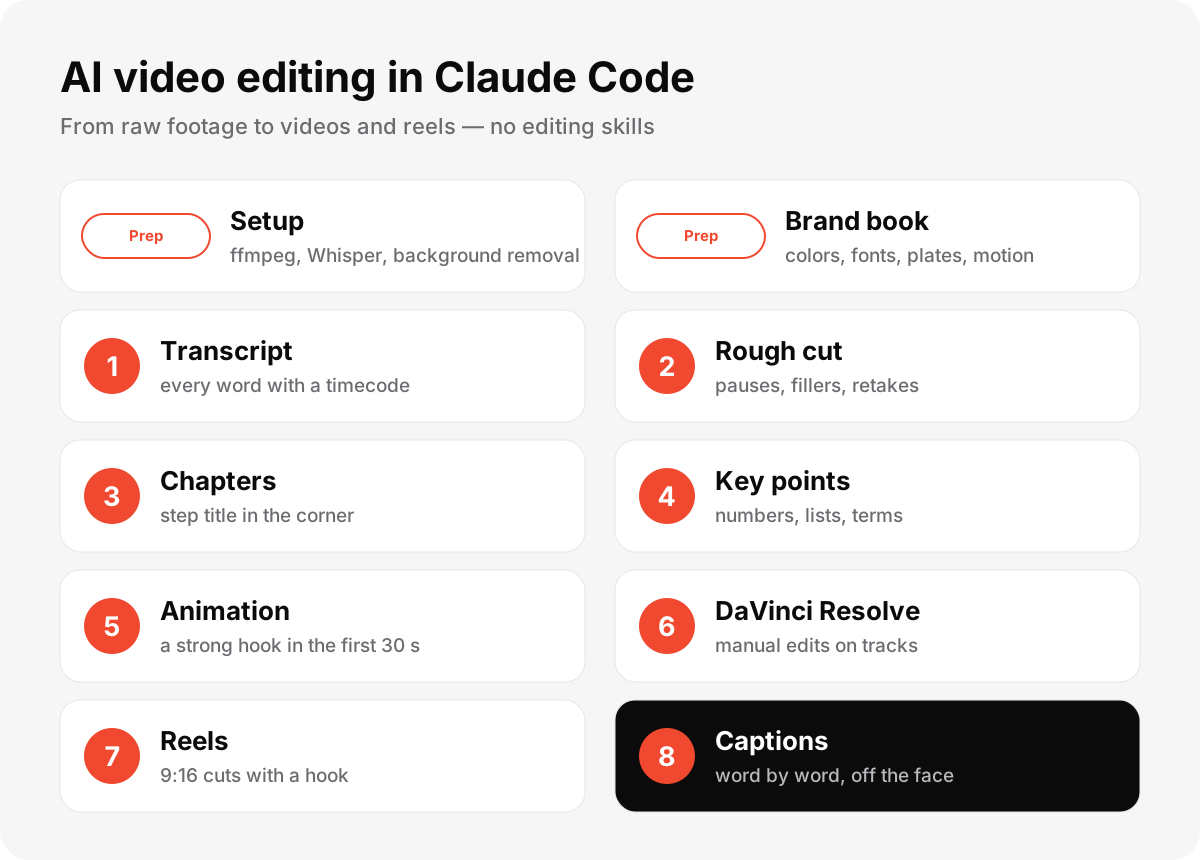
Setup and brand book
Put your footage in a folder and ask Claude to install everything needed. Then build a brand book from references you like — otherwise you get the default "AI look".
The folder [path] contains my video footage. Install everything needed for editing: ffmpeg, the Whisper speech model, word-level audio alignment and background removal. Check that every file opens and tell me its duration, resolution and frame rate. Do not edit anything yet.
The references folder has examples I like. Study them and create a brand book for my videos in brandbook.md: mood, 2–3 HEX colors, free fonts, plates and highlights, reel caption style, motion rules and what we never do. Show it on a frame from my video and do not edit until I approve.
Steps 1–2. Transcript and rough cut
The transcript must include everything you hear — fillers, slips, repeats and pauses. Then ask for a list of cuts first and cut only after your approval. Shorten pauses to about 0.2 s (never to zero), keep fillers inside continuous phrases, keep the last good take and start exactly on the first word.
Make a rough cut from the transcript. First show me the list of cuts with timecodes and reasons, and do not cut until I say "cut". Shorten pauses over 0.4 s to 0.2 s, remove fillers, off-topic talk and failed takes (keep the last good one). Do not clip the start or end of words. Start on the first word.
Steps 3–5. Chapters, key points and animation
Add short chapter titles in the corner, put terms, numbers and lists on screen in sync with speech (no more than 15 seconds without graphics), and make the strongest motion in the first ~30 seconds — the hook. Always ask for a list first, then approve.
Steps 6–8. DaVinci Resolve, reels and captions
Connect Claude with DaVinci Resolve and ask it to lay out the project on separate tracks so you can fix small things by hand. Then ask for 5 reel ideas with hooks, edit them in 9:16 in the same style, and add word-by-word captions that stay below the face and outside the social media safe zones.
How long it takes
The author's first video took about 3.5 hours of Claude's work plus a couple of hours to figure things out; the second took about 3 hours. A reel takes about half an hour. Claude works in the background, and a month of the plan costs about as much as an editor charges for one reel.
This guide is based on the video "This video was edited by AI" (in Russian). The author's full prompts for every step are in the video description.
Read also

Voiceover with ElevenLabs and Google AI Studio: Our Favorite Voices
ElevenLabs and Google AI Studio voices we like for Shorts, news, audiobooks and storytelling — plus a prompt for warm delivery and a way to fix stress.
Where to Find Web Design Inspiration: 28 Sites from Awwwards to Moodboards
The sites we open every week ourselves: awards, landing galleries, UI libraries, moodboards, fonts and animation. Plus five steps to turn inspiration into a working project.
Flat-File Micro-CMS in PHP: When JSON Storage Is Enough Without MySQL
Engineering pragmatism: building a PHP micro-CMS using JSON storage instead of an external database server. Atomic file writes, session isolation, security controls, and an honest SQLite comparison.
Ready to start?
Leave a request — we will contact you within a business day, consult for free and provide an estimate.
Comments
No comments yet — be the first.